FlowVault for Studios

Your curriculum.
In every student's pocket.

FlowVault gives aerial studios a curriculum tool students actually use. Assign moves, add safety notes and conditioning tips — your expertise lives in their library, ready whenever they train. No extra app. No extra cost to your students.

Currently in private beta · iOS only · Limited studio spots

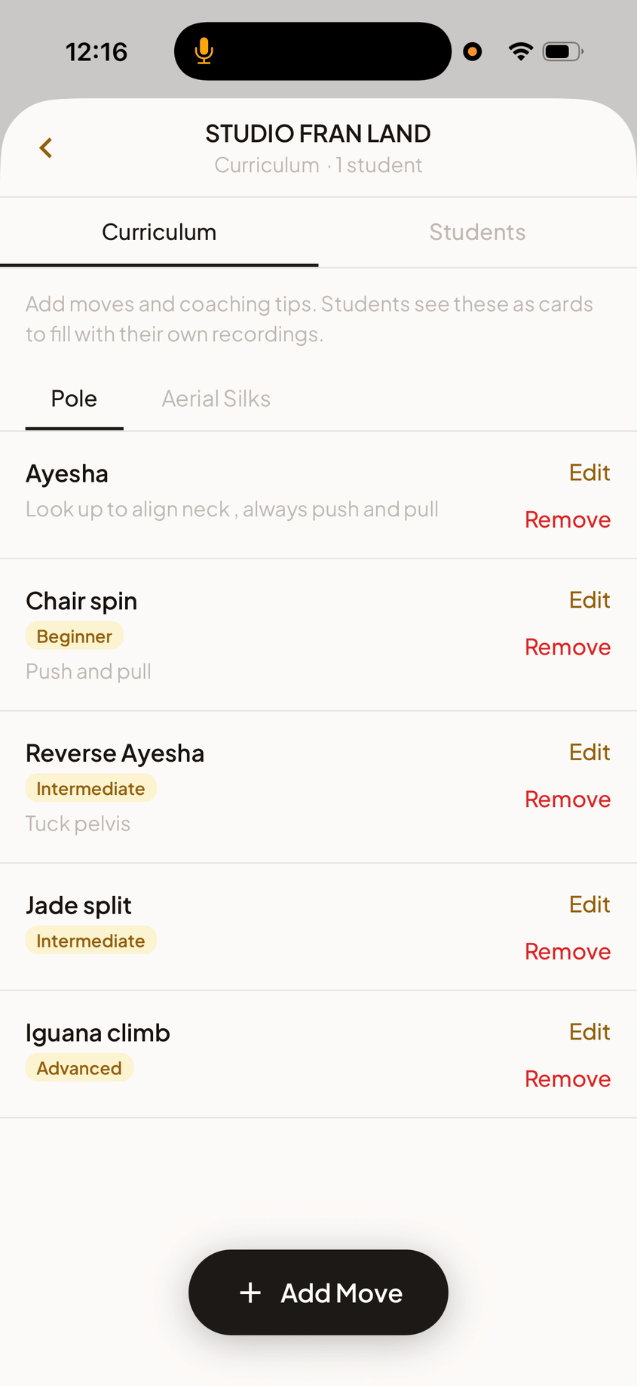
Teacher view — manage your studio's curriculum and roster
What you build
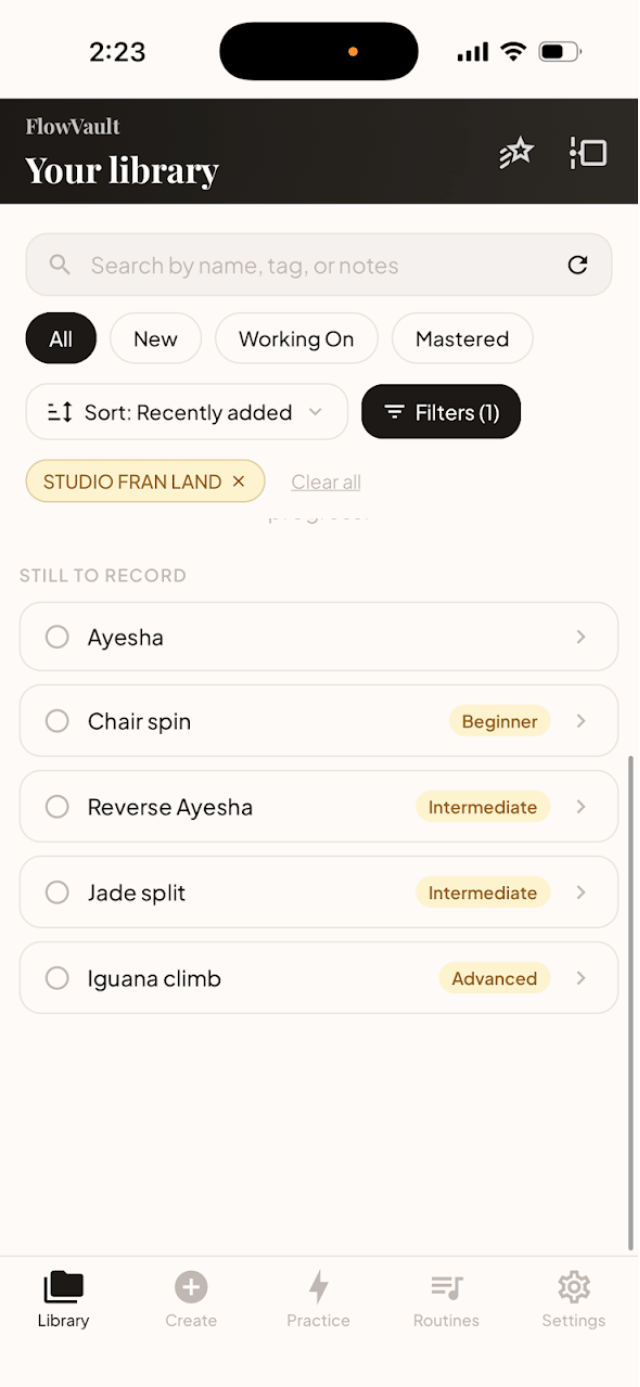
Student view — your teacher's curriculum in your library
What they see

Your curriculum
doesn't make it home.

Curriculum lives in a Google Doc
Students screenshot it once and never look again. Your safety notes and progressions don't follow them into practice.
Your guidance stops at the studio door
You teach, they leave. Your safety notes, cues, and conditioning advice don't follow them home — and there's nowhere for them to live.
Students forget moves between sessions
They film a clip, it disappears into their camera roll, and next week they're starting over. Your teaching time gets wasted on re-teaching.

Tools built for
how studios actually work.

Curriculum

Your syllabus,
alive in their app.

Upload your curriculum once. Moves you assign appear directly in each student's FlowVault library — with your safety notes, form cues, and progressions exactly as written.

  • Assign specific moves to your class or individual students
  • Add safety notes, form cues, and level progressions per move
  • Students see your curriculum without a separate app or account
  • Update curriculum anytime — changes sync immediately
Student Roster

Your studio,
your students.

See who's connected to your studio and approve join requests. Your curriculum shows up in their library automatically — no setup on their end.

  • Approval-based join flow — you control who's in
  • Assigned moves appear in each student's FlowVault library
  • Students train from your curriculum wherever they are
  • No extra app, no extra cost to them
Conditioning Tips

Training advice
built into every move.

Add conditioning recommendations — strength work, flexibility drills, body prep — directly to each move in your curriculum. Your expertise follows students home.

  • Attach specific exercises to individual moves
  • Students see your recommendations inside their move card
  • Off-the-pole training guidance, in context, always accessible
  • Moves students add themselves also get suggested conditioning
Shared Storage

One place for
your studio's content.

Studio plan includes 500 GB of shared storage. Keep reference clips, demo videos, and curriculum media in one place your whole team can access.

  • 500 GB shared across your studio on the Studio plan
  • Video, photo, or text per move — whatever format works for you
  • Students can upload their own clips alongside your reference content
  • ~5,000 short clips or ~1,650 longer sequences

Every move
has homework.

Most of the work happens off the pole. As an instructor, you can attach conditioning recommendations to any move in your curriculum — hip flexors for the jade split, shoulder stability for the ayesha. And when you haven't added your own, FlowVault auto-suggests them so students always have something to drill. Either way, your guidance doesn't stop when class does.

  • Add specific exercises per move — sets, reps, duration
  • Strength, flexibility, and body-prep tied to the move it's for
  • Auto-suggested conditioning shows up when you haven't customized — your students aren't left empty-handed
Side Superman move detail — student notes plus suggested conditioning drills

Start small.
Scale when you're ready.

Both plans are built on top of Member. Your students stay on their own free plan — no cost to them.

Studio Lite
$14.99/mo
Everything in Member, plus:
  • Curriculum management — cues, safety notes, level progression
  • Student roster + approval flow
  • Conditioning tips per move
  • Up to 30 students
Apply for Studio Lite

Get early access

FlowVault is currently in private beta. We're onboarding a small number of studios to test and shape the curriculum tools. Fill this in and we'll be in touch within a couple of days.

We'll reply to the email above, usually within 2 business days.

Application received.

Thanks for applying. We'll review your studio and be in touch at the email you provided — usually within two business days.

← Back to FlowVault